Cockpit · the workspace for your AI sessions

Your work lives in
AI sessions now. Cockpit is where you open them.

Every Claude Code, Codex and Kiro session on your Mac, in one window. See which ones are waiting on you, answer them, and read the documents they wrote. Free, native and local, with no account.

See how it works

Free · local · no account · your work stays on your Mac

Scale yourself with AI

One person. One week.
167 days of work.

21.2 hours of their time, across 50 AI sessions, in a week when 70% of their calendar was meetings. Here's the week as Cockpit summarised it, with company details taken out.

What you achieved · this week · written by Cockpit

This week: Cockpit helped you ship a prototype, publish three analyses and set up a new program across 50 sessions. You built a compatibility command-center prototype: an API in Rust that reuses an existing evaluation engine (79 tests passing), with a 16-screenshot user guide live on the staging site. You then opened it to five colleagues, and fixed the access-permission gap behind one tester's errors. You created highly accurate deep-dive architecture documents for two legacy systems, to prepare their replatforming projects. You also produced the charter for a new product evaluation program with review cadences run from Asana, and a draft customer-segmentation paper with a 25-slide deck. You created a report showing the percentage of code written by AI across the organization (spoiler: it's 100%). For operations, you refreshed the weekly operations report in three formats, tracked release-speed pipelines, and launched a weekly status process for 27 projects with its own Slack channel. In people work, you prepared the talent review sheet, promotion memos for four engineers and an outline for a fifth. You also gave a team access to run experiments across 17 code repositories (about 331 experiments), traced a traffic loss to a single code change, resolved 7 tickets, and published a wiki page on compatibility. Smaller items: a security analyzer rule, a repository transfer and privacy attestations. By hand this was about 167 days of work, done in 21.2 hours: more than your meeting-free time allowed, by about 60 weeks.

By hand: ≈ 167 days · Done in 21.2 h

Cockpit

Building the thing and leading the people, in the same week. With Cockpit, player-coaching just got a massive upgrade.

"Our director asked me how you manage to get as much done as you do. He doesn't understand."

A Cockpit user's senior manager

Cockpit's own estimate, from the code and documents the week produced. How it's worked out is in the app, and the rates are yours to change.

The idea

Built on sessions, not files.

For forty years, productivity apps were built around the file: the document, the spreadsheet, the folder of code. Now most work starts as a conversation with an agent, and the file is just what it leaves behind. The session holds what you asked for, where it stands, every step it took, and an agent you can still talk to.

Cockpit reads the sessions Claude Code, Codex and Kiro already save on your Mac and turns them into one workspace: a board of everything in flight, the documents each one produced, search across all of it, and a place to start the next one. Nothing to import, nothing to upload.

What needs you

See what's waiting. Answer in one screen.

With a dozen tasks moving at once, the hard part is knowing which one finished and which is waiting on a question you never saw. Attention is one table of the tasks that need you, each with a reply box.

  • Claude Code and Codex in one list
  • A red badge the moment a task needs you
  • Reply, approve a permission, or stop a run with ⌘.
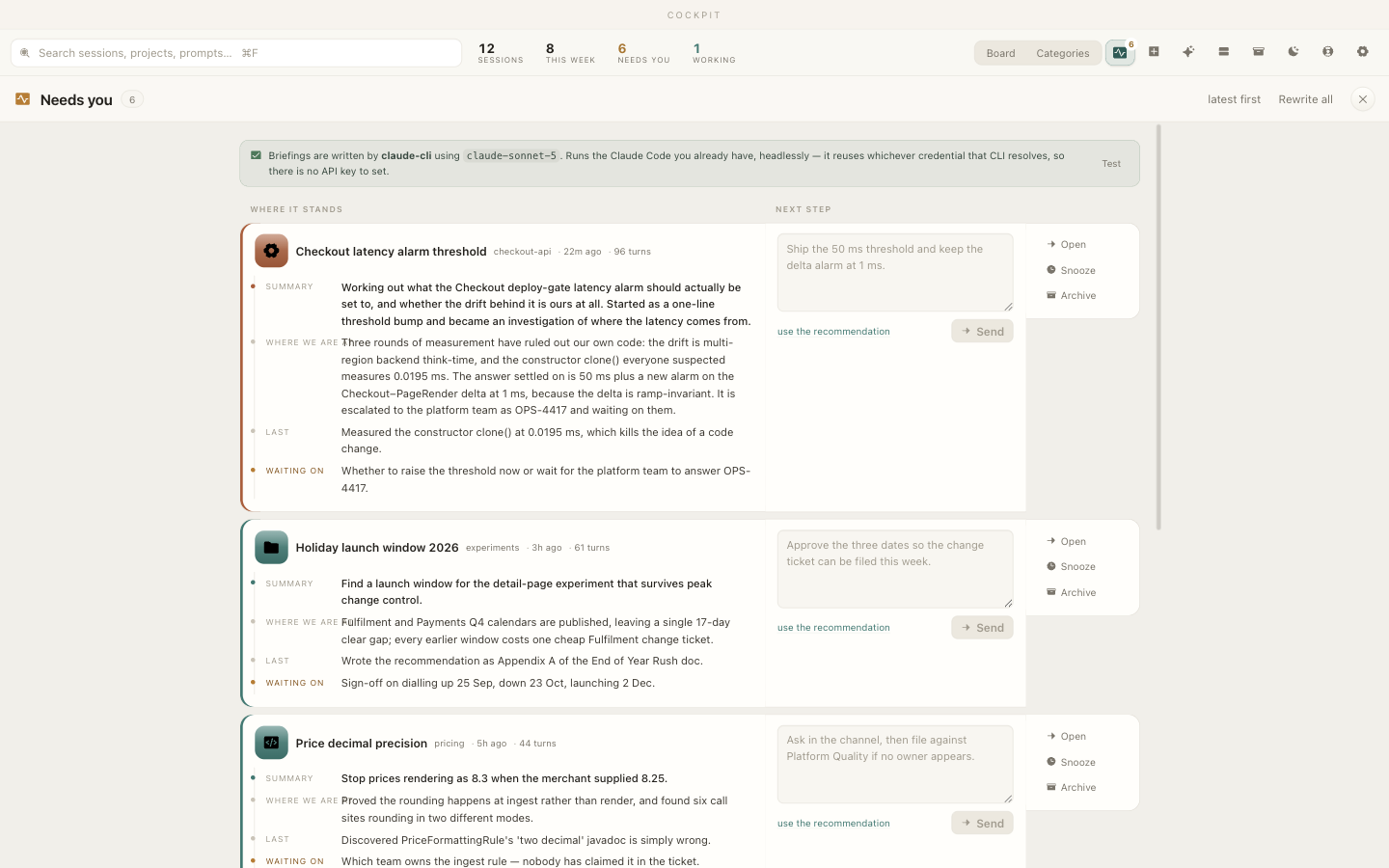
Cockpit's Attention view: a table of the sessions waiting on you, from Claude Code and Codex, each with a reply box.

Start work

Every new task starts with an agent on it.

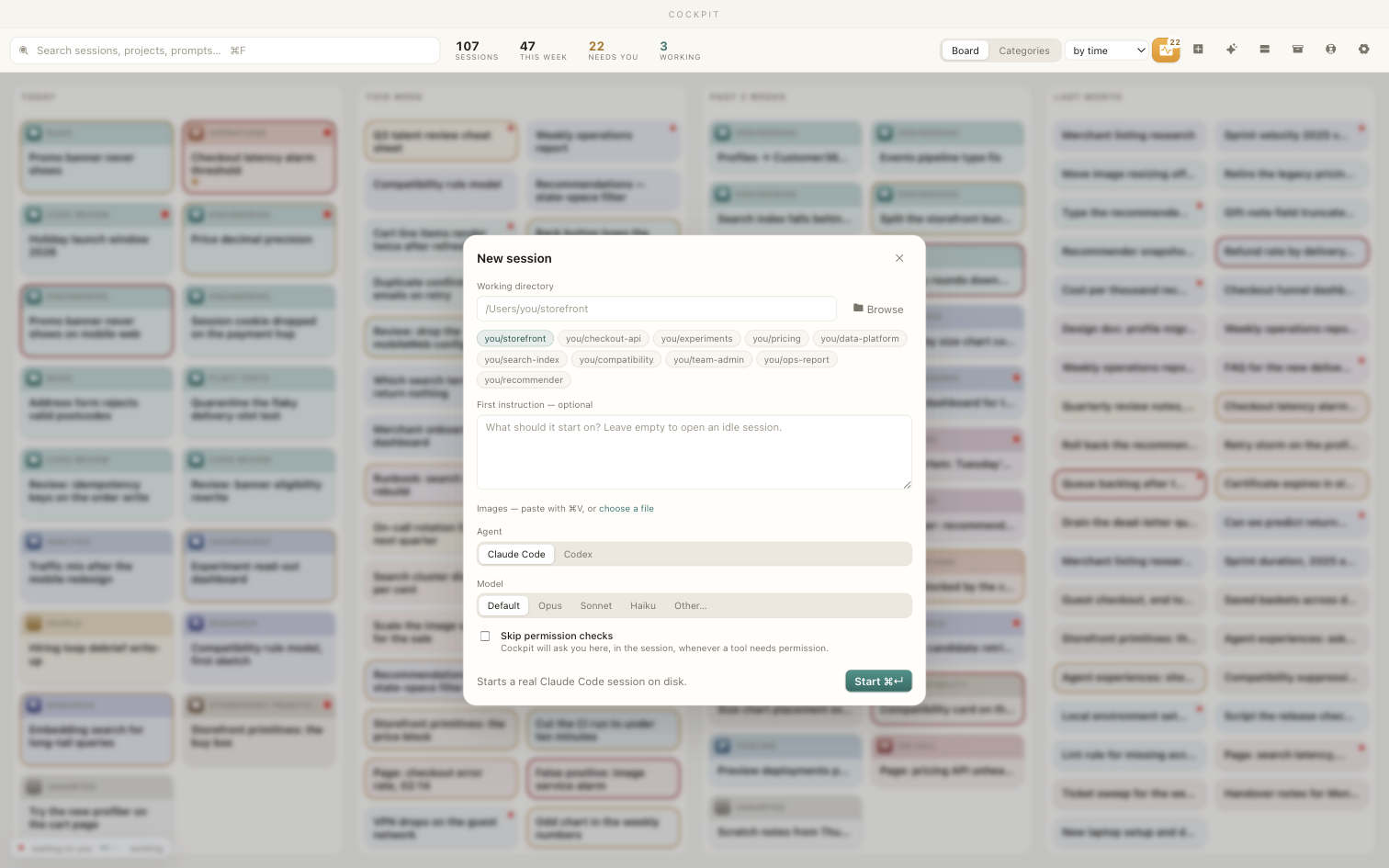
Hit +, pick a folder, write the task, and choose Claude Code or Codex. The card lands on the board and the work starts while you move on to the next thing.

  • Start Claude Code or Codex from the app
  • Recent directories one click away
  • Paste images straight in with ⌘V
Starting a new session in Cockpit: pick a directory, write a first instruction, and choose Claude Code or Codex.

Every task

Open one and read the whole story.

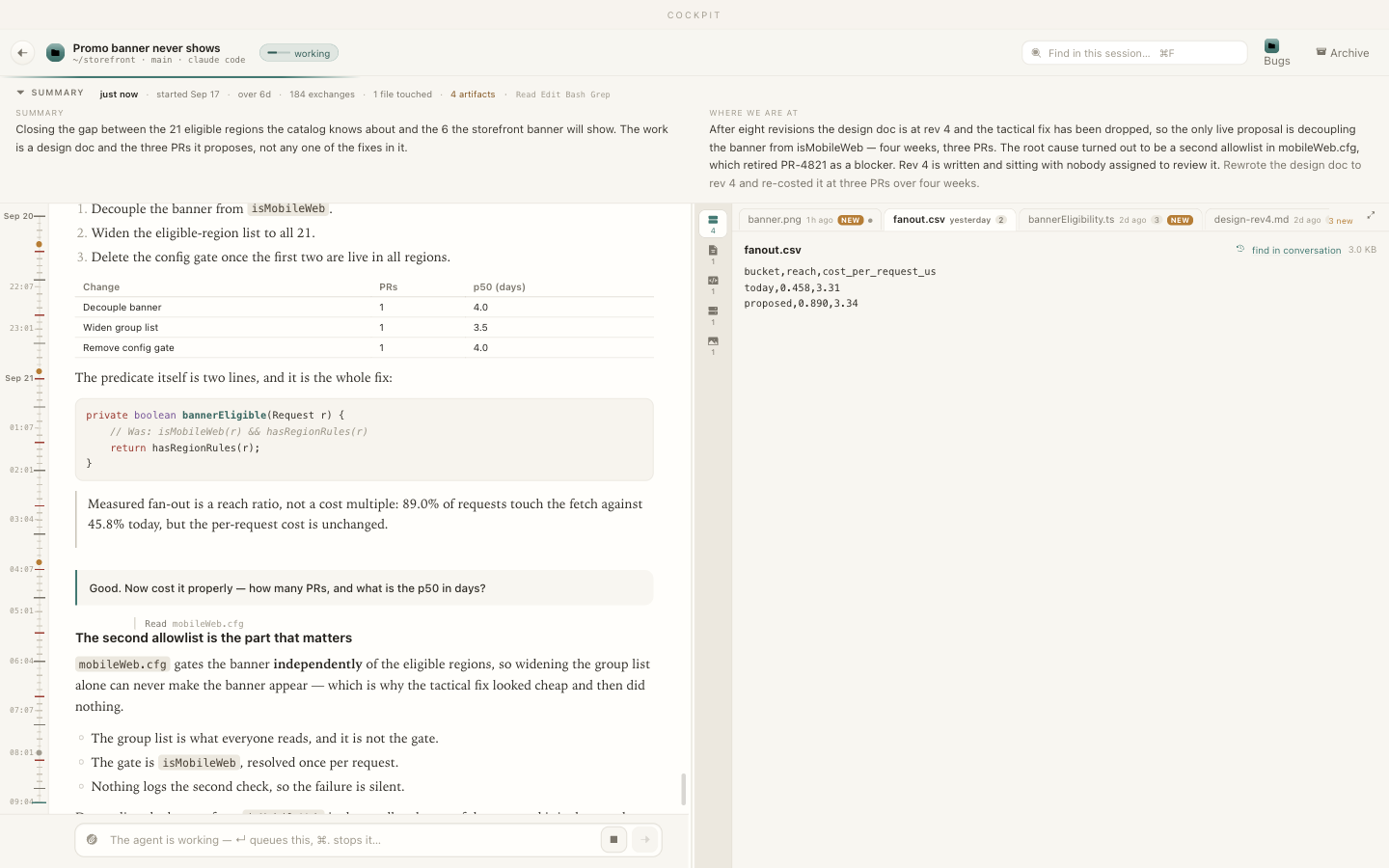
A summary and a "where we are" at the top, then the transcript, readably. The files the agent wrote become tabs, each with a version timeline you can diff and restore from. Select a passage, say what's wrong, and send it back.

  • A summary, not a wall of logs
  • Files as tabs, every write kept and versioned
  • Add your own document viewers as drop-in plugins
An open session in Cockpit: transcript, a summary up top, and the agent's files as tabs with a version timeline.

Every project

Keep hundreds of tasks in order.

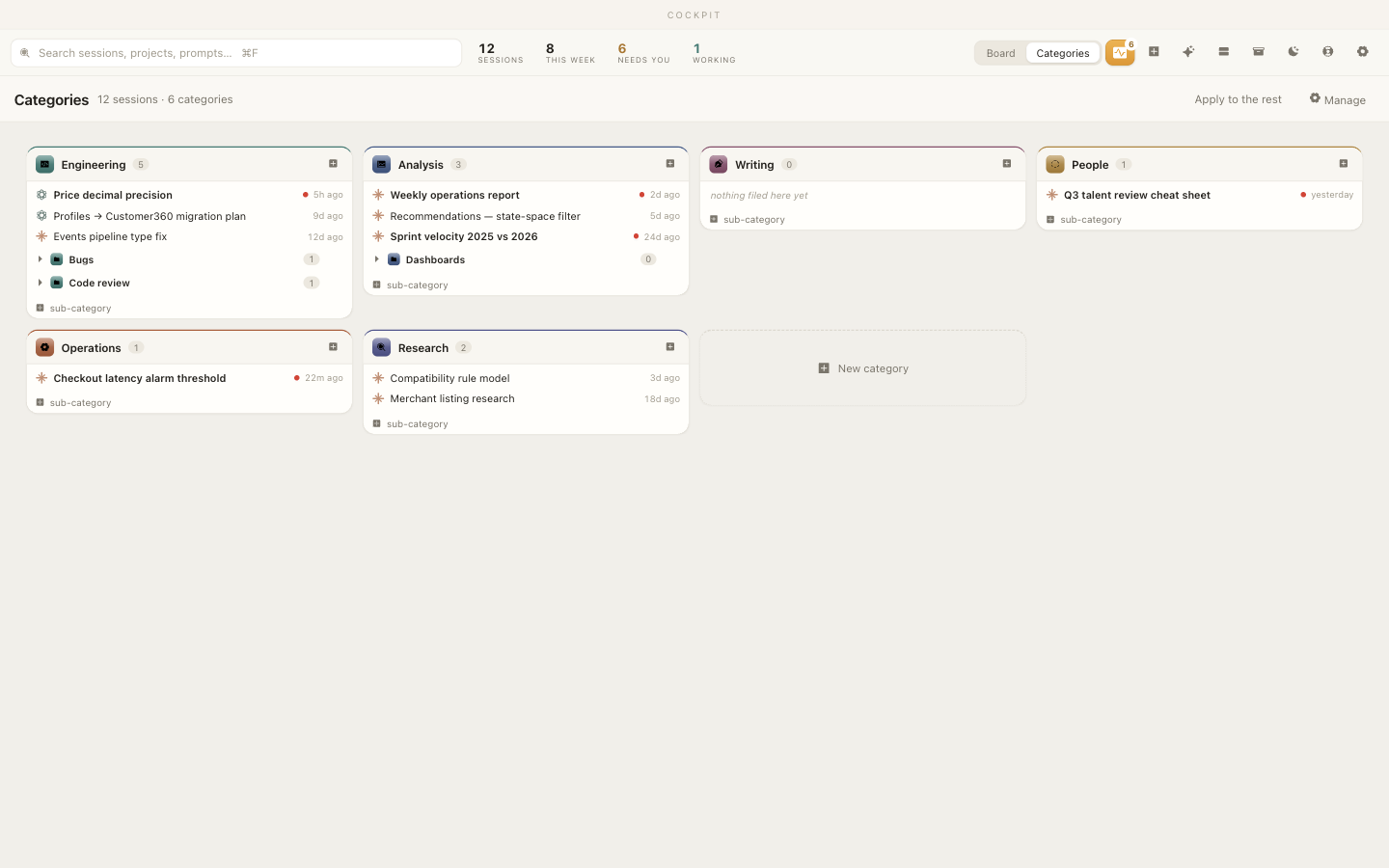
Drag a card into a category; rename, recolour, and add sub-categories from its own icon. Pin the flows you keep coming back to. Weeks later the thread is right where you left it, searchable, not lost in a closed terminal.

  • Categories with colours, icons, and sub-categories
  • Pin the recurring flows
  • Search across every task, past and present
Cockpit's Categories view: sessions filed into colour-coded categories with sub-categories.

Documents

Work with what the agent wrote, don't just read it.

Comment, explain, or spin off

Select any passage and choose. Comment sends a note back to the agent that wrote it. Explain answers your question in the margin without interrupting its work. New session starts a new task from that passage in the background.

Full version history

Every write the agent makes is kept. Each file has a timeline you can read backwards, diff, and Restore from, for when an update breaks something that was working.

Word, web pages, and more

Word documents on white pages, tables, images, and any web page an agent mentions render as they should, not as raw text. Add a viewer for a new type as a drop-in plugin.

New in 0.1.8

The page an agent built, right beside its answer.

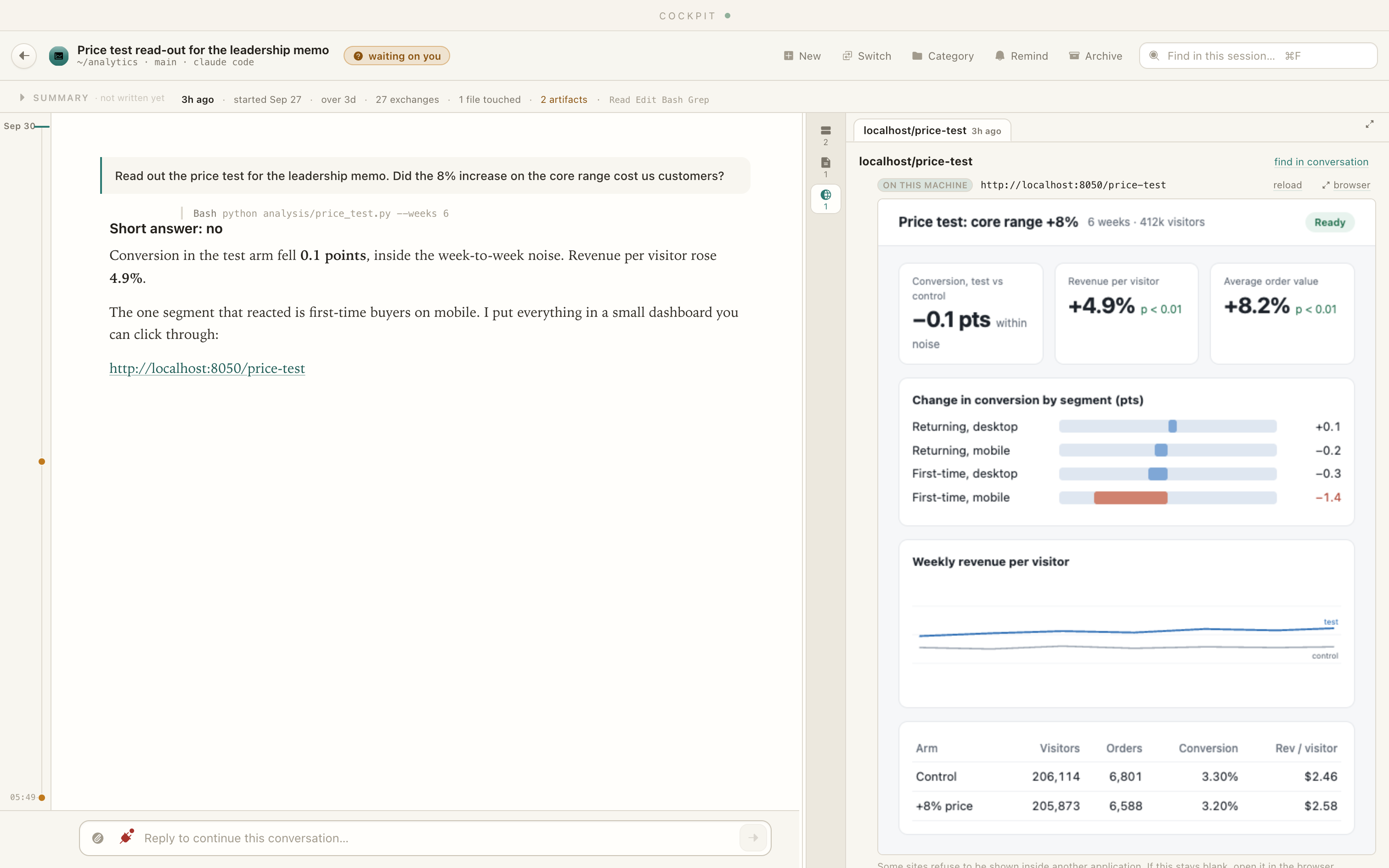
More and more, what an agent hands back is a link: a dashboard it just built, a page it found, a doc on your intranet. Any address a task mentions now opens in the panel next to the conversation, so you read the answer and check the evidence in one window.

  • Local dashboards, web pages and internal docs
  • Sandboxed, with one click to your browser
A Cockpit task titled Price test read-out for the leadership memo, with the agent's answer on the left and the dashboard it built open in the panel on the right.

New in 0.1.9

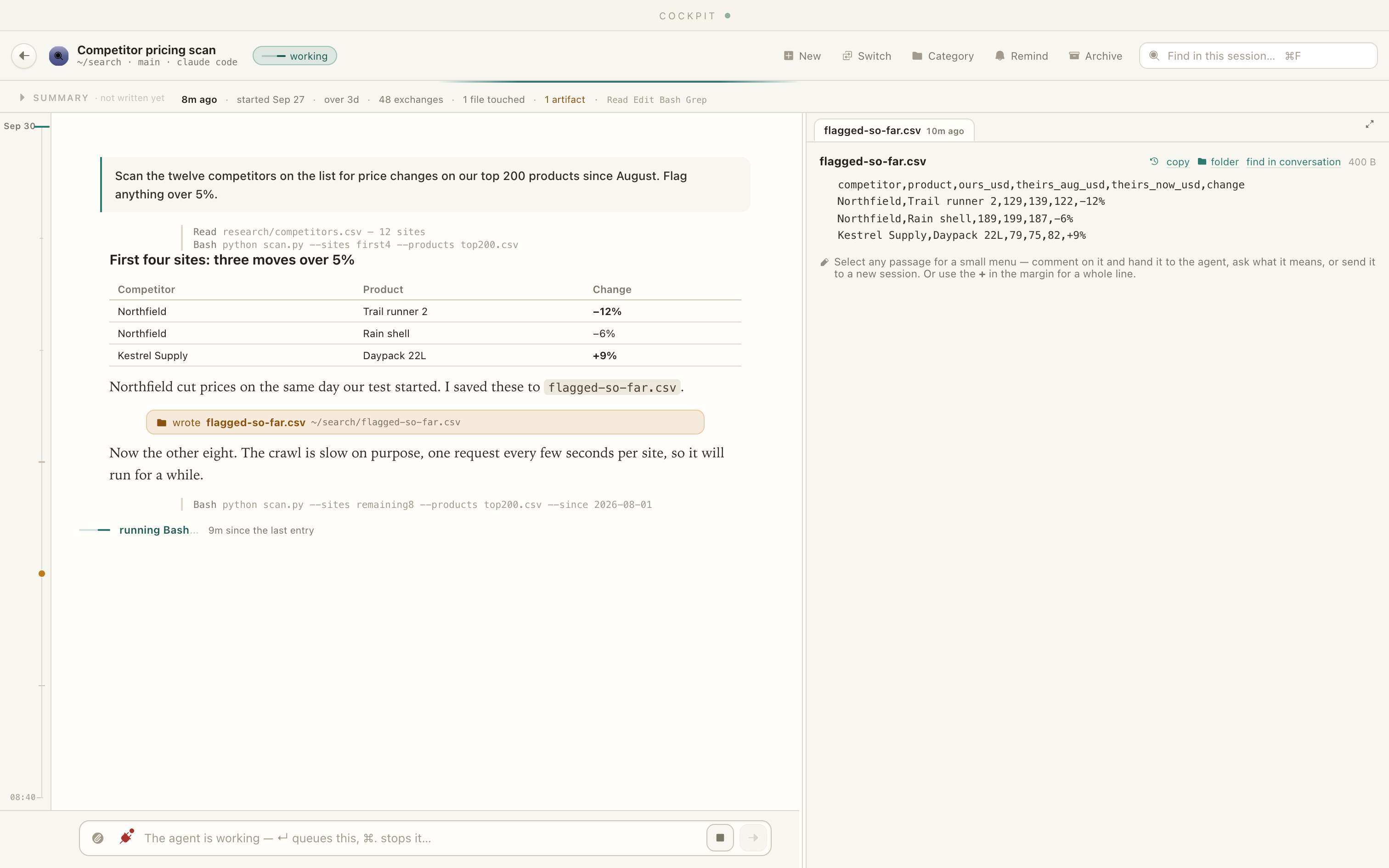
Long work still looks like work.

Hand an agent a twenty-minute job and it goes quiet until it's done. Cockpit now goes by what Claude Code and Codex report, so the task stays marked working, shows what's running and for how long, and keeps the stop button within reach.

  • "running Bash… 9m since the last entry"
  • A task that really died settles after half an hour
A Cockpit task titled Competitor pricing scan, marked working, with the note running Bash, 9 minutes since the last entry, and the flagged results open beside it.

Also new in 0.1.8 and 0.1.9

Move between tasks as fast as you think.

⌘S between tasks

Hold ⌘ and tap S to walk your recent tasks, like ⌘Tab for apps. The first stop is always the one you just left.

Reminders

Set a date and time on any task. Cockpit notifies you and highlights the card until you deal with it.

Know when work finishes

When a task you're not looking at finishes, you're told which one. A message sent mid-task says where it landed in the queue.

Your company's tools, in reach

Each connection (Drive, Slack, your CRM, your warehouse) lists what it can do, with its own reconnect button and a plain reason when a sign-in has lapsed.

Today's documents first

A week-long task opens on the last day of work, not thirty tabs. Older files are one click away.

Comments where you wrote them

A comment opens over the passage it's about, and you can reword it even after the agent has it.

For companies

Safe to roll out to a whole team.

Cockpit runs on each person's Mac and works with the Claude Code or Codex setup your company already approved. There's nothing new to send your data to, and nothing to take on trust.

Your work never leaves the Mac

Cockpit has no server and no account. It reads sessions and documents on the machine and never sends their content anywhere. The only traffic with your work in it is what your agents already send to your model provider, including through Bedrock or a company gateway. Anonymous usage counts can be turned off for every machine with COCKPIT_NO_TELEMETRY=1.

Build your own plugins

Teach Cockpit your internal document types, tools and review flows. Viewer plugins are documented, live outside the app so an update never removes them, can add their own actions to the selection menu, and can be checked against your real MCP servers before anyone else runs them.

Support when you need it

Rolling Cockpit out across a team, need a direct line when something breaks, or want a plugin built for your internal systems? We offer support plans for companies. Talk to us or use the contact form.

Your work stays on your Mac.

No account and no cloud. Cockpit reads your tasks on your Mac and never sends their content anywhere; the only thing that goes out with your work in it is the request to the model you picked. Anonymous usage counts, numbers only and never anything you wrote, are on by default and one checkbox turns them off. See exactly what leaves your Mac.

Questions

Frequently asked

How do I manage multiple Claude Code sessions at once?

Cockpit shows every Claude Code, Codex and Kiro CLI session on your Mac on one board, by recency or by category. The ones waiting for an answer or a permission are flagged, and you can reply to any of them from the same window.

Is there a GUI for Claude Code on the Mac?

Yes. Cockpit is a free, native macOS app that reads the sessions Claude Code already writes to disk. Open any session to read it, answer it or stop it, with the documents it wrote open beside the conversation.

Does Cockpit work with Codex and Kiro too?

Yes. It reads Claude Code, Codex and Kiro CLI sessions side by side, and you can start a new session with any of the three from the app.

Do I have to start my sessions inside Cockpit?

No. Cockpit reads the sessions you already have, wherever you started them: a terminal, an IDE or the app itself. They appear the first time you open it, with nothing to import.

Can I search across all my Claude Code and Codex conversations?

Yes. Every transcript, and the text documents your sessions wrote, are indexed on your Mac, so you can find a session by a name, a ticket number, an error message or anything said in it.

Can I comment on a document an agent wrote and send it back?

Yes. Select a passage in a Markdown, Word, PDF or web document, write a comment, and it goes to the agent that wrote it with the quoted text. The agent's answer appears under your comment.

How does Cockpit estimate the time saved?

Cockpit reads what each session produced (code, documents, slides and figures) and converts it to hours with published rates, such as lines of code per day and words per hour. With your calendar connected, it also shows how much of your meeting-free time that would have filled. The rates are shown in the app, and you can change them.

Does my data leave my Mac?

Cockpit has no account and no server, and it never sends your sessions or documents to us. Its own model calls go through the Claude Code or Codex you already use. Anonymous usage counts are on by default and can be turned off.

What does Cockpit cost?

The app is free. Companies rolling it out to a team can buy a support plan.

Open every AI session in one place.

It's free, it's local, and it opens with a double-click. Grab the app, or read the guide first.

macOS · Apple silicon and Intel

Free because it runs on the Claude Code or Codex you already have: you pay your model provider directly, and there's no server for us to run or data for us to sell.

Get in touch

Questions, press, or a support plan?

Send a note and it lands straight in our inbox. Or email support@aidash.dev.